
TV antenna FAQs
Straight answers from your local Mr Antenna technicians, rated 4.9★ from 3.6k+ reviews. Can't find yours? Call 13 11 49.
Prices and quotes
How much does a new TV antenna cost?
Our full installation of a quality Australian-made antenna starts from $449.
The final price depends on your home: single or double storey, tin or tile roof, whether there's a bracket and cabling already in place, and whether you need a booster to run several TVs. Your local technician will check all of this on site and give you a fixed price before any work starts.
Is the quote free, and is the price fixed?
Yes, and yes. Your local technician will come out and take six signal readings from your roof. This shows how much signal is available in your area and how much needs to reach your TV through the cabling. They'll then give you a free, fixed-price quote, and they'll only start the work once you've approved it. No surprises on the bill.
Do you price match other quotes?
We're not the cheapest and we're not the dearest, but we aim to be the best. Every job uses a quality Australian-made antenna and quad-shield cabling to keep interference out. If you have a genuine written quote from a genuine company for the same materials, we won't be beaten on price.
Reception problems
Why does my TV say "No signal"? Is TV reception down in my area?
Almost certainly not. TV transmission towers are some of the most reliable in the country and rarely go down. Here's a handy link to check if the towers are down in your area: mySwitch.
"No signal" means no signal is reaching your TV's tuner through the cable. Somewhere between the antenna and the fly lead plugged into your TV, there's a fault or a break. Common causes are a faulty connector, splitter or amplifier, or a power supply.
Quick check first: if your system has a masthead amplifier, it runs off a small power supply, often plugged in near a TV. If that's switched off or unplugged, the signal stops and every TV shows "No signal".
Still nothing? Your technician will measure the signal at the antenna, then trace the fault along the cable.
Why is my TV picture breaking up or pixelating?
Digital TV is all or nothing. With old analogue TV, a weak signal gave you a snowy picture. Digital stays perfect until the signal drops below a certain level, then it breaks up or freezes.
That's why we set your signal well above that level. When bad weather or interference, such as from power lines, takes some of the signal away, there's still plenty left and your picture stays perfect. Every technician carries modern testing equipment to get it right.
Why does my reception get worse at night?
It shouldn't. If it does, the usual culprit is electrical interference from things that come on in the evening, especially LED downlights and their drivers, or appliances.
Try this: with the TV on, switch your LED lights and appliances off one at a time and see if the picture improves. The ACMA, Australia's TV regulator, recommends the same test.
If you find the cause, the fix is usually quad-shield cable, which has four layers of shielding to keep that noise out, and/or a new antenna to lift your signal well above the level where breakup starts.
Does bad weather affect my TV signal?
It shouldn't. A correctly fitted antenna in good condition will keep working through rain and wind.
If your picture drops out in bad weather, it usually points to a problem with the antenna itself:
- Rain: water has got into the balun (the small connection box where the cable meets the antenna), or two elements have bent close together and the rain shorts across them.
- Wind: loose or broken elements are knocking against each other and causing a short.
If your reception drops out during storms, it may be time for a new antenna.
Can a nearby mobile phone tower affect my TV reception?
Yes, and we've seen it many times over the years. A typical case is a cheap antenna installed without a filter, then a new phone tower goes up nearby and the picture suddenly starts breaking up.
The better antenna makers, including the ones Mr Antenna uses, now build a 4G filter into the antenna. It blocks the unwanted mobile signals and lets only the free-to-air TV channels through.
Our advice: get a quality antenna fitted the first time. If you already have the problem, a 4G filter, a new antenna or moving the antenna usually fixes it, which is the same fix the ACMA recommends.
My picture looks fine, so why would I need a new antenna?
Usually, you don't. If your picture is clear on every channel, there's typically no reason to upgrade.
The exception is an antenna that's physically damaged: bent, rusted, or with loose elements that look ready to fall off. That's a safety risk, because parts can come down off the roof, and it will cause reception problems sooner or later.
Not sure what shape yours is in? Your local Mr Antenna technician can check it for you.
How do I retune my TV?
Today's TVs are a bit like computers: sometimes they just need a rescan. It's also how you pick up new channels. When Nine launched 9Rush, for example, it didn't appear on every TV automatically, and many viewers had to rescan to find it.
To rescan, open your TV's Menu and go to Settings, choose Channel scan (or Auto-tune), and select Digital terrestrial only. Don't tick analogue. Press Scan and wait while the TV finds all the channels.
Menus vary between brands, so check the user manual for your model. You can usually download it from the maker's website.
Antennas and TV points
Do smart TVs need an antenna?
To watch free-to-air TV properly, yes. Every smart TV has a built-in digital TV tuner, and the only thing that can feed it is a digital antenna.
You can watch over Wi-Fi instead, using streaming services such as Netflix or Prime Video, or the networks' own apps: ABC iview, 7plus, 9Now, 10 and SBS On Demand. But streaming depends on your internet speed and quality, so it can buffer or drop out, especially during big live events.
For the most reliable free-to-air TV, nothing beats a quality digital antenna.
Can I watch free-to-air TV without an antenna?
Yes, on a smart TV you can, using the networks' free apps: ABC iview, SBS On Demand, 7plus, 9Now and 10 (formerly 10Play).
However, these rely on fast internet. In our experience, many customers find the picture freezes or buffers when their internet speed isn't up to it.
For the most reliable free-to-air TV, with no buffering and a high-definition picture, nothing beats a good-quality digital TV antenna.
What antenna do I need for my area?
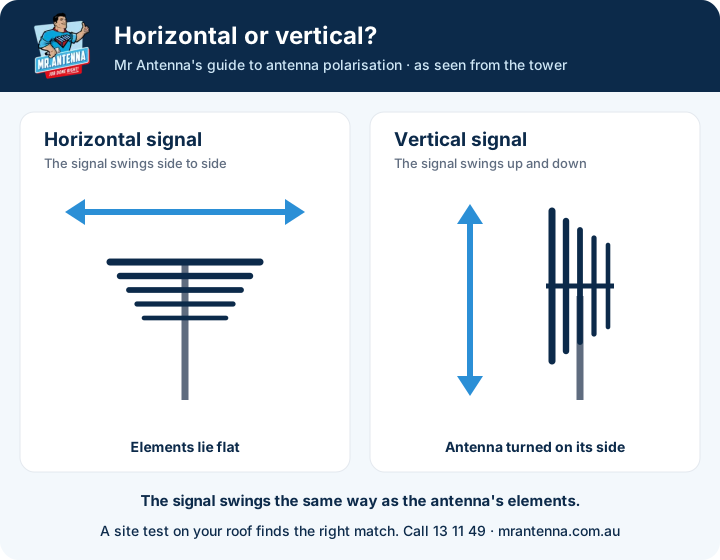
It depends on which tower serves your home. Most Australian capital cities broadcast on VHF, channels 6 to 12 (174 to 230 MHz). But to stop neighbouring towers interfering with each other, the ACMA (Australia's broadcasting regulator) plans some areas to use UHF towers instead. It can also change a tower's polarisation from horizontal to vertical, which means the antenna has to be mounted on its side.
That's why a good antenna technician does a site test on your roof, measuring signal quality and strength to find the best tower for your home and the right antenna to suit it.
Can my antenna go in the roof space instead of on the roof?
We always recommend mounting your antenna outside, on the roof.
Fun fact: when TV arrived in Australia in 1956, viewers had to pay a licence fee, and inspectors went door to door. Some people hid their antenna in the roof to avoid paying.
An antenna in the roof space can work, especially if you're close to the transmission towers. But a tin roof blocks the signal, and on a tiled roof a sheet of rainwater over the tiles becomes another barrier. We always aim for the best signal possible, well above the level where your picture breaks up.
How many TVs can run off one antenna?
As a general rule, a good-quality antenna in a good reception area can run two to three TV points.
The only way to know for sure is to measure it. Your technician takes a signal reading at the antenna, then works out how much signal will be lost through a 2-, 3- or 4-way splitter. If there's still enough signal at each TV to stay above the level where the picture breaks up, you won't need a booster. If there isn't, we'll recommend a distribution amplifier.
Do I still lose signal to extra TV points if those TVs are switched off?
Yes. Signal is lost as soon as the cable runs through a splitter, whether the other TVs are on or off.
Think of a garden hose. On its own, the water pressure at the end is strong. Split that hose four ways and each end gets less pressure. A TV splitter works the same way: the signal is divided at the splitter, not at the TV.
That's why we measure and calculate before adding TV points, so every TV gets enough signal.
Do indoor antennas work?
They can, but they're not the ideal solution. How well one works depends on your area, the quality of the indoor antenna, and which way your home faces the transmission tower. Does the signal have to pass through double-brick walls, or is the antenna facing a window?
Results vary a lot from home to home. For reliable reception on every channel, the best solution is a quality antenna installed outside, with cable running down to your TV.
What our customers say
"Very honest… told us the price… we give him 10 out of 10."
Stephen H."Turned up on appointment time… the work was done within an hour."
Dean W."On time, did a great job & cleaned up after he had finished."
Matthew R.
Warranty and our technicians
How long should a new antenna last?
A long time. That's why we offer a lifetime warranty on our premium antennas.
The weak spot in cheaper antennas is the plastic that holds the aluminium elements together. Without UV stabilisers, a few Australian summers of sun, heat and rain leave it hard and brittle, and the elements start falling off. We see it all the time.
Mr Antenna's antennas are Australian-made specifically for us and have been improved over many years. That's why we can back them for a lifetime. After all, we've been around since 1991.
What warranty do I get?
Depending on the antenna you choose, you'll get our 5-year, 10-year or lifetime warranty. The lifetime warranty covers the antenna and our workmanship.
It's a full warranty. If your antenna fails, your local technician comes back, takes the old one down and installs a new one. You don't pay for the antenna, and you don't pay for the labour.
Compare that with an antenna bought off the shelf: the warranty usually covers the antenna only, so it's up to you to get it off the roof, take it back to the store and put the new one up yourself.
Are your technicians qualified and insured?
Yes. Every Mr Antenna technician is trained and certified, holds a working-at-heights certificate and carries public liability insurance.
So you can relax while the job is done safely and properly, and you're covered if anything goes wrong.
Renters, landlords and apartments
I'm renting. Who pays to fix the antenna, me or the landlord?
In most cases, the landlord. Under tenancy laws, if there was an antenna when you signed your lease, the landlord needs to keep it working, just like other fixtures. In Victoria, for example, Consumer Affairs Victoria says non-urgent repairs must be made within 14 days of a written request.
Mr Antenna works with real estate agents all over Australia, so whether you're a tenant or a landlord, give us a call and we'll help.
One thing to note: if you're a tenant and the landlord is paying, we'll need permission from your property manager or landlord before we start.
Are antenna repairs tax deductible for landlords?
Generally, yes. The ATO lets you claim repairs to a rental property in the year you pay for them. A brand-new antenna is usually claimed over a few years instead, so check with your accountant.
To claim, you'll need a proper tax invoice showing the words "tax invoice", the business's ABN, the date, the work done and the GST.
The good news? Mr Antenna emails you a tax invoice for every job. Lost it by tax time? Just give us a call, because we keep it on file.
TV wall mounting
Can you also mount my TV on the wall?
Yes, absolutely. Every Mr Antenna technician is trained in TV wall mounting and carries quality wall mounts in the van, so if you decide on the day, just ask.
Why mount your TV?
- Safety: children can't pull it off the cabinet.
- Looks: today's slim TVs can look more like a piece of art than a TV.
- Space: it frees up room on the unit underneath.
- A clean finish: your soundbar and other gear can be neatly mounted too.
How high should I mount my TV?
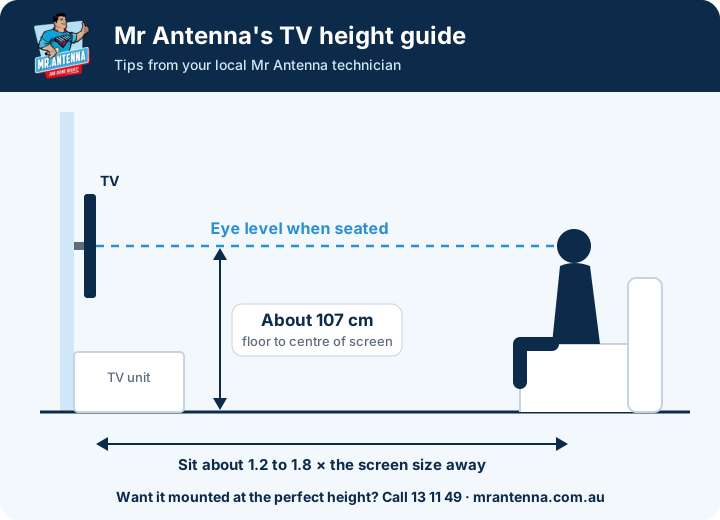
Aim for the centre of the screen to be level with your eyes when you're seated. That's usually about 107 cm from the floor to the middle of the TV. Looking up at a TV that's too high is tiring and can strain your neck and eyes.
Sit about 1.2 to 1.8 times the screen size away. For a 65" TV, that's about 2 to 3 metres.
| TV size | Sit about |
|---|---|
| 55" | 1.7 to 2.5 m |
| 65" | 2.0 to 3.0 m |
| 75" | 2.3 to 3.5 m |
| 85" | 2.6 to 3.9 m |
Mounting above a fireplace or a tall unit? A tilting bracket angled down (no more than 15 degrees) helps. Your technician will help you find the perfect spot on the day.
See our TV wall mounting service and recent TV wall mounting jobs.
Can I mount a TV in a rental, or on plasterboard (Gyprock)?
Yes, we mount TVs for tenants all the time, with minimal damage. The bracket screws go through the plasterboard and into the timber studs behind it, so it's strong and secure. Many tenants choose not to hide the cables inside the wall, which means the only marks are two to four small screw holes.
It's wise to ask your property manager or landlord first. Some landlords ask that when you move out, you take the TV but leave the bracket on the wall instead of patching the holes.
Always double-check with your landlord and get their permission in writing before we start.
Starlink
Do you install Starlink?
Yes, absolutely, and we love it. We've installed many Starlink dishes and we pride ourselves on doing it properly.
We've worked with manufacturers to custom-make our brackets, so they fit perfectly and stay strong through the harshest Australian weather. Your technician fits the right mount for your tin or tile roof, runs the cable to your router and runs a speed test before they leave.
Starlink installation starts from $490. You supply the Starlink kit.
Do you supply the Starlink?
No, Mr Antenna does not supply Starlink. Starlink is ordered online, directly from Starlink, with a monthly subscription. For your convenience, here's the link: starlink.com/au.
We do, however, supply brackets for all types of roofs, and our technicians are fully qualified. We love Starlink. It's a great service.
More questions
The picture on my TV is all fuzzy. Can you fix it?
In some instances such as moving home a simple retune of the tv is all that may be required, if not then checking the fly lead is connected to the tv and wall socket, if this is all ok the best solution is to call one of our friendly technicians to come and diagnose the issue.
What Causes interference in my TV?
TV signal interference is caused by various things such as a faulty antenna, incorrect antenna for your area, damage to cabling in the home ( can be caused by rodents) external interference such as CB radios, and 4g telephone towers. It can be quite difficult to identify what is the problem without the correct test equipment, so the best solution is to have a technician come out and do a full test of your antenna system to identify the fault.
My TV isn’t working. Can I troubleshoot it myself?
Is it plugged in?
Have you turned it off and on have you tried an automatic retune? Power supply for the amp.
My telly is very far away from the antenna. Is this a problem?
In some cases you will require a signal amplifier. Your technician will test the signal from the antenna and calculate the loss for the system, taking into account cable length and amount of points required, this will determine if an amplifier is required.
Aren’t all antennas the same? What’s the difference between them?
Different parts of the country transmit free to air tv on different frequencies hence the requirement for different antennas. Metropolitan areas are generally on the VHF spectrum and regionally are on the UHF spectrum. Different antennas are also cut to specific frequencies to eliminate external interference that others may pick up.
Do TV antennas have to be Digital Ready? What makes them special?
Old analogue antenna systems may not receive all of the digital channels and also may pick up other interference such as 4g, your technician will select the correct new digital antenna and will be tested for your area
I need Free-to Air TV in my motor-home (or boat), what should I do?
Applying for Vast is the best option as it is a satellite service and has coverage over the majority of the country. This can be done via permanent roof-mounted satellite dishes that automatically track the satellite or manual portable dishes and set-top boxes.
Where is the spot for an antenna to be installed?
Your technician will provide a signal test and pick the best location on your roof for the installation, during this they will take into account signal strength and quality, the most efficient cable run to eliminate loss and also the ascetic placement of the antenna to suit the property.
What Is Viewer Access Satellite Television?
Vast is designed for two different types of customers, those are remote and regional areas that do not access to transmission towers can apply to have vast installed that is run via satellite, this services also offered to travellers such as caravaners so they have access as they travel the county.
Who is Mr Antenna?
Mr. Antenna is Australia’s largest and only true national Television Antenna Installation Company
Mr Antenna provides more reception solutions to Australians than any other company, having supplied over 600,000 new antennas since 1991. Mr. Antenna offers a wide range of solutions, including simple system servicing, installation of new UHF/VHF and Digital antennas including installation of the latest Digital Set Top Boxes (STBs), and structured cabling systems.
Mr Antenna has branches in Sydney, Melbourne, Brisbane, and Adelaide. It covers the major regions of NSW Central Coast, QLD Gold Coast, and the Mornington Peninsula (VIC).
Customers can contact Mr Antenna via its Client Care Team 7 days a week, from 8 am to 6pm Monday to Friday, from 8am to 4pm Saturdays. 13 11 49.
What are the most common reception problems?
The three most common reception problems are:
- Pixelation
- Snowy pictures
- Picture patterning
I can't get a good reception. What could be the problem?
Poor TV reception no matter how hard you try?
There are a number of factors that affect your reception. In simple terms they are:
- Distance and “line of sight” from main transmitting towers.
The quality of reception received is directly related to the physical distance between your location and the transmission towers of your local TV station. Good reception should be expected up to say 50km (??) from your nearest transmission tower, though this is not the sole criteria.
Also important is whether there is a relatively clear line of sight (i.e. no major physical obstacles such as mountains or tall buildings) between your location and the transmission towers.
Generally speaking, the closer you are to a transmission tower and the clearer your “line of sight”, the better your chances in receiving good TV reception.
- Physical environment
Should your line of sight be impeded by physical obstructions, then this may effect the quality of TV reception you receive. Do you live in a valley surrounded by high mountain ranges? Are you surrounded by a number of tall buildings? Tall Trees? You could be living in what is known as a reception “black spot”. Indeed, any number of factors could be preventing you from receiving the best possible TV reception.
If you are experiencing reception problems we suggest a site inspection and antenna system check from a trained Mr. Antenna technician. They are best equipped to advise what problems you may be having – and how to fix them!
- Condition, Age or Type of existing antenna.
There are approximately 7 million households in Australia, yet only 600,000 antennas are estimated to be sold in Australia every year. Looked at another way, a householder may only ever consider servicing or upgrading their antenna system once every 10 to 12 years, with the average age of antennas probably somewhere around 5 years.
A lot can happen in that time, from a gradual deterioration of the antenna and cabling itself, changes to the local environment, or even changes in network transmissions (such as the migration to Digital Television from 2010).
Antennas older than around 4 or 5 years may not digital compatible therefore they will need to be upgraded in order to pick up full digital
- Changes to your TV /Home entertainment set up.
This is quite common (especially if there is a DIY/Handyman in the house!). Not many people realise that this has a direct effect on the quality of TV reception they receive. Consider this. Have you recently;
- Added additional TV points (and even more Televisions off the single antenna!),
- Extended the distance between your TV reception point(s) and your antenna
- Changed the physical location of your external TV antenna
- Manually (or inadvertently) adjusted the direction of your external antenna
- Upgraded your Home Entertainment System (particularly to Digital TV!) All of these factors may have a bearing on the quality of reception received.
- Condition of your TV!
This sounds obvious, but often isn’t. Despite advances in television manufacturing technology, the age of your television may be a contributing factor to TV quality. - Network transmissions (esp. Digital)
Generally speaking the transmission quality from the major networks is unquestioned. Much has been written recently regarding the increase in general interference (in certain areas) to existing TV reception caused by test Digital transmissions by the major networks. Much of this testing has now been completed. The Federation of Commercial Television Stations (FACTS) is able to update customers on the current status of such transmissions. Their contact details are - Local interference
Finally, poor TV reception could also be caused by local (and sporadic) interference such as the usage of electric devices, machinery and so on.
What areas in Australia does Mr. Antenna service?
We have local antenna technicians across Australia, with coverage in Melbourne, Sydney, Brisbane, Adelaide, Geelong and the Gold Coast. Each one of our technicians runs their own local business, so the person who comes out knows your area. If you're unsure, give us a call on 13 11 49 and we'll confirm availability.
What about Digital?
Digital television is a replacement technology for existing free-to-air (FTA) analogue services. It will provide better picture quality and reception, plus a variety of new features that will greatly enhance the viewing experience.
Australia has chosen the European DVB standard as the Digital Terrestrial TV or DTTV standard. DVB is proving to be a very high-quality system and is being used in many countries around the world. In Australia, it will replace the analogue PAL system.
Digital television commenced on 1 January 2001 and most Australians will be migrated to digital by 2010. All the major Australian networks are transmitting in Digital.
Getting “Digital” is as easy as having Mr. Antenna supply and install a new Digital Set Top Box to your existing television set.
Where is free-to-air digital television available?
Metropolitan areas: Digital transmissions became available in Australia’s five major capital cities ¬ Sydney, Melbourne, Brisbane, Adelaide and Perth – from Jan 1, 2001 (and from main transmitters only). Non-Metropolitan/Regional: Outside of the major metropolitan areas, regional broadcasters must begin digital transmissions by no later than 1 January 2004. Digital broadcasting in some regional centres will start in mid-2001, and others later. A timetable for the commencement of digital broadcasting in remote parts of Australia has not yet been settled. Most Australians will be migrated to Digital by 2010.
What is a “Digital Ready” antenna system?
A Digital Ready antenna system is :
- Where the antenna is designed to receive VHF Ch 2 to 12 & UHF 28-48;
- Is supported by a cable system with high immunity to electrical interference i.e. Tri or Quad shield RG6 cabling, and has F-Type connector interface from the antenna throughout the system to the wall plate
What about audio quality?
Digital TV sends sound digitally, just like the picture, so it can be as clear as a CD and is clearly better than analogue. Many channels also broadcast Dolby Digital surround sound.
Is audio better on digital television than analogue?
Yes, absolutely. Digital TV in Australia, now broadcast in high definition, sends both the picture and the sound digitally, and the sound is far better than the FM stereo we were used to with analogue TV.
Channels carry MPEG digital stereo sound, and many HD channels, movies and sports also carry Dolby Digital, with up to 5.1 surround sound when your TV, soundbar or home theatre supports it. Some newer channels also use AAC digital sound.
To hear it at its best, connect a soundbar or home theatre to your TV with an HDMI ARC or optical cable. We can set it up when we mount your TV.
Standard Definition (SD) vs High Definition (HD) pictures?
The definition (detail and quality) of pictures received by your TV is directly related to the type of TV being viewed, and the quality of the TV antenna and cabling system that is connected to it. Most existing television equipment (including common analogue TV sets) already receive what is known as Standard Definition pictures i.e. 525 lines of picture resolution over your (near square) 4:3 ratio TV screen. SD Digital transmissions (which are now being broadcast in all areas transmitting in digital) help overcome most traditional reception problems (such as ghosting) when decoded to your TV via the Digital Set Top Box.
The other key benefits of SD Digital (such as DVD/Cinema quality pictures & CD sound) are now a reality for the most basic of TV hardware setups, together with widescreen viewing on television sets with a 16:9 TV screen format (i.e. Widescreen TVs). Compared to Standard Definition Television, an HD TV image (a feature only available via a significantly more expensive HD Television receiver) has twice the luminance definition – vertically and horizontally. HD pictures are composed of between 1080 to 1125 lines of resolution whereas standard television pictures are only 525 lines as noted above i.e. even more detail and clarity – but at a price!
Within two years of the commencement of digital broadcasting in an area, and in addition to their analogue and Standard Definition transmissions, commercial television broadcasters and the ABC and SBS will be required to provide at least 20 hours per week of programs shot in HD.
Other than for real home entertainment buffs, however, there is no real need to wait for HDTV, with the Federal Government requiring broadcasters to provide a digital SD signal at all times, even when HD (High Definition) programs are being broadcast. This is to ensure that viewers will always be able to receive a digital transmission whether on an SDTV or HDTV TV receiver.
Again, the HD integrated television receiver (HDTV) or the HD set-top box (HD-STB) is expected to cost significantly more than SD integrated television receivers (SDTV) or the SD set-top box (SD-STB).
In effect, the Government is setting a very high-performance benchmark for the TV broadcasters via their HDTV transmission guidelines. It’s the best of both worlds. Those with more expensive tastes (and deeper pockets) will be able to enjoy full home entertainment viewing, whilst the average TV viewer will also enjoy the best that Digital TV has to offer on their existing TV systems.
What is multi-view?
Not too long ago, viewers watching sports were at the mercy of the director and cameramen. The extra bandwidth or space in each TV channel created by DTTV has meant that directors can now fix camera angles and invite the viewer to choose the particular preferred angle. This is, of course, is dependent on the TV station. Programs like these have been telecast by commercial networks. ABC and SBS, on the other hand, have utilised the extra bandwidth to telecast additional programs simultaneously (i.e. multi-channelling).
Multi-view lets you take the director’s chair and select from a variety of camera angles. Multi-view is particularly suited to sporting events like cricket, tennis and motor racing. On channels adjacent to the main program the viewer can select, via remote control, several different full-screen views of the same event or related information.
What are program enhancements?
Viewers of digital television will have a wide choice of ‘enhancements’ to regular programming. Enhancements are separate channels of video, data or audio, which are related to the program on the primary channel.
Sporting events will offer the choice of different camera angles, action replays, player profiles or other information. Across a range of programming, digital viewers will have a choice to select more information related to the regular program – product information, recipes, news background and much more.
In addition, if a sports event overlaps with the news, digital viewers may be offered the opportunity to watch the regularly scheduled news bulletin or the completion of the event on a separate channel.
What is Closed Captioning?
Closed captioning provides deaf and hearing-impaired viewers with the text of what is being spoken on television. The text is usually shown in a black box at the bottom of the picture.
Hearing-impaired viewers will be familiar with current analogue captioning which can be received on analogue receivers with Teletext capability. Captioning is normally ‘closed’ to viewers but can be accessed by those who need it.
Closed captioning of programming for hearing impaired viewers will be done for all English language news and current affairs programs as well as for all primetime programs (6.00 pm to 10.30 pm).
What is an EPG (Electronic Program Guide)?
An EPG is an Electronic Program Guide. It arrived with digital TV and has come a long way since. Press the Guide button on your remote and you can see what's on now, what's on next, and what's showing up to 7 days ahead, on every free-to-air channel.
If you were born before 1980, you might remember buying the TV Week and flicking to the centre pages to find the TV guide. The whole family would sit around it and plan the week: "Let's watch this, it's on Thursday night." How things have changed! Today it's all at your fingertips, instantly.
The history of television in Australia Work in progress
Still have a question?
Our friendly Customer Care team can answer it, or book a local technician for a free, fixed-price quote.
